30 Mar 2026
Using AI to generate code for AI Agents
The whole world is transitioning over to using AI for more and more things, so obviously we need Yeltzland to be on the cutting edge and make sure users can get Halesowen Town results in this new, exciting future 😁
Reusing existing Alexa code
A while back - when this was all the rage - I wrote an Alexa skill
You can ask it about the latest score, who do we play next etc. by basically fetching the fixtures/results data I maintain for the mobile apps, and then parsing it into a response suitable for a voice assistant.
Clearly in theory I should just be able to port this logic into a MCP service - the emerging standard for integrating with API assistants.
Using AI to write the code
This also seemed an ideal task for an AI coding agent to do the actual work of getting it ported to an AI-friendly format.
I’ve been using GitHub Copilot Pro for a while, it fits well into my workflow at a reasonable cost (currently $10 per month)
I set it the task to port the existing Alexa skill code into an MCP service I could run on AWS Lambda, and after a few iterations it did a pretty good job.
The service logic itself is almost completely reused, but the new code is around specific MCP support - which isn’t super-obvious how to do when running as a Lambda function.
Interestingly the first iterations worked, but were quite verbose as they weren’t using the latest MCP packages - which meant the coding agent wrote some of those new features itself.
A common occurrence out of the box as they can never be completely up to date out of the box without some help.
I pointed the agent to the latest documentation specifically, and instructed it to use the latest package, and it then did a nice job of refactoring the code to make it much more understandable and readable to this puny human.
Product Engineering
I think this is a perfect example of how the job of being a software engineer is changing right under our feet. We not really “coders” any more- although I’d strongly argue that was never what we were
Tim Checkley from Loomery - who I worked with recently - summarised this perfectly in a great post recently, that the role is being transitioned to being a “Product Engineer”.
An understanding of user needs, as well of what is possible rather than just how to code them, will be far more important going forward than it is now
I strongly urge everyone to give this a read
Installation Instructions
If you want to give this MCP a go, there are full instructions on how to set it up at https://bravelocation.com/mcp-instructions - AI generated of course
Programming note
The text written here is the only thing not AI generated, so any nonsense, spelling mistakes or gramattical errors are all down to me. The terrible summary image was made by Chat GPT based on the post (has that glorious “Made for LinkedIn” look 🤣)
15 Feb 2026
Sounded like a good idea, but turned out less useful than I hoped
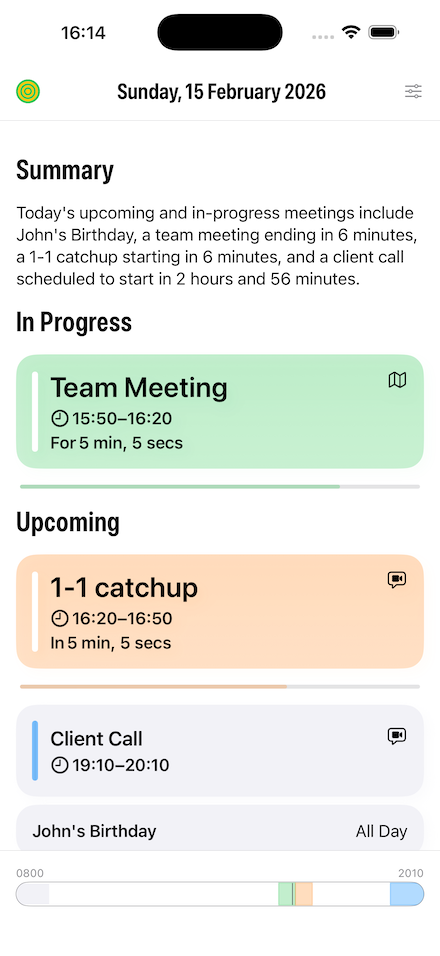
I decided to add daily summaries in my Sideboard app using Apple Intelligence, but it didn’t turn out as well as I’d hoped
A quick recap - the app basically shows you all your upcoming calendar events for today and tomorrow, and shows a countdown both during and before your meetings
I wanted to test out using Apple Intelligence to see if it could generate a nice text summary of your day, and also learn about using Apple’s Foundation Models on device
You can see from the screenshot from the iOS app below how it turned out:
The code part
Apple’s actually done a nice job of making it easy to integrate their local Foundation models into your app
You can write a Custom Tool that can expose your model data in an LLM friendly way, and then get an text summary back in a few lines of code
Below is a truncated example of my code …
let session = LanguageModelSession(
    tools: [MeetingsSummaryTool(meetings: upcomingMeetings)],
    instructions: "You are a professional productivity app. Provide a concise, business-appropriate summary for the upcoming day in a formal tone. Focus on the most important and timely information. Keep summaries to a single sentence, and don't just restate the information about the meetings, the user can see that already in the app. Don't restate the meeting details as a list. Don't add any formatting or markdown."
)

do {
    let response = try await session.respond(
        to: "Provide a concise professional summary of today's upcoming or in-progress meetings.",
        options: GenerationOptions(sampling: .greedy, temperature: 0.0) // Try to keep the results the same
    )

    return response.content
} catch {
    self.logger.error("Summarise error: \(error)")

    return ""
}
Obviously the real skill is in the prompt engineering, and the above prompts are the result of a lot of trial and error trying to get the best results
Also note the GenerationsOptions() line, where I set the temperature to 0.0. This basically tries to keeps the same results given the same input, which I wanted to do as the summary is regenerated every minutes as the upcoming meetings may change
The result
I tried all sorts of prompts to try to improve the outcome, but I was pretty disappointed in the results. Now it could be that with better prompting you would get better results, but to be honest the summaries don’t add a great deal to the app
It’ll be very interesting when Apple release their new Gemini-backed Foundation Models later this year, to see if they can do a better job. I really hope so!
If you want to try the summaries yourself, they are available via an optional setting (on an Apple Intelligence supported device of course!) in the latest version of Sideboard
P.S. The hero image at the top is obviously an AI generated image (via ChatGPT not from Apple Intelligence of course!)
22 Dec 2025
I'm ridiculously excited about doing this 😆
I’m pleased to announce my Yeltzland iOS app now has support for CarPlay
Supporting Radio Halesowen Town
The team from Radio Halesowen Town has done a great job of providing radio commentaries for both home and away matches over the last few years
With their permission, and after a daft amount of back and forth with Apple, I added support for streaming the station in the app a couple of months ago
This meant I could apply for the “Audio” CarPlay entitlement from Apple to let me add CarPlay support, and surprisingly that went through without a hitch (although unsurprisingly it took ages to be approved)
Code for adding CarPlay support
It was pretty simple to get this working
Basically you add a CarPlayDelegate class to your main app that implements CPTemplateApplicationSceneDelegate, and setup CarPlay support by making a few changes to the app’s Info.plist
CarPlay allows you to configure various UI template classes with your specific details, and then it will handle the drawing of screens on the myriad of different devices and screen dimensions
I basically setup the “now playing” template with the Radio Halesowen Town stream details, and then everything works fine
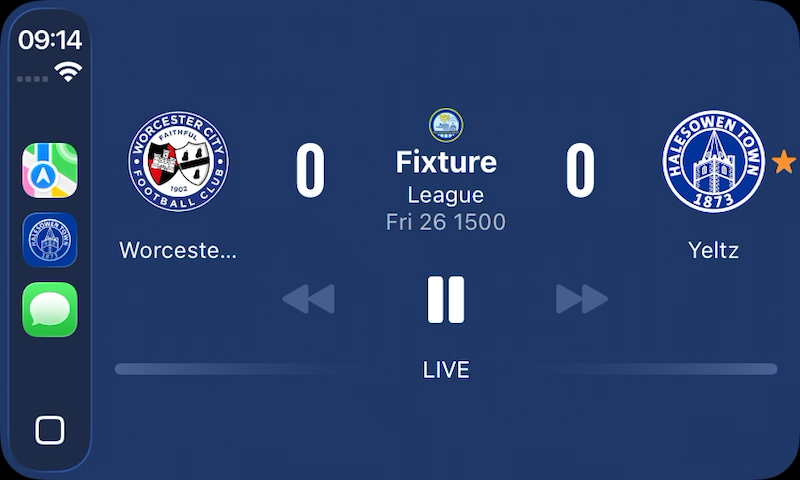
iOS 18+ also supports settings “sports score” information, with the teams playing, latest score etc. and obviously I already have that information available in the app, so supporting that was a breeze
You can see from the screenshot below it came out pretty nicely, even though I say so myself!
One more step along the road of getting Yeltzland on every possible screen 🤣
P.S. Yes, before you ask I am thinking about supporting Android Auto as well
20 Nov 2025
I posted back in March 2025 about how I’m using social media now - basically switching to Mastodon and BlueSky for text, and TikTok and YouTube for video sharing.
8 months on I’ve pretty much stuck to that, and have surprisingly got much more (maybe too much!) into TikTok, and not posting much text any more
One problem I did find is that posting a link to TikTok on Mastodon or BlueSky didn’t look so good, as they don’t do a great job of implementing OpenGraph tags. So I thought I’d fix that myself
Redirect Pages with Custom Metadata
My solution was to make some intermediate redirect pages hosted on my own site here that contain the exact Open Graph metadata I want, then automatically redirect to the TikTok video.
First, I created a custom Jekyll layout called redirect.html that handles the redirection while including all the necessary metadata:
<!DOCTYPE html>
<html lang="en-gb">
    <head>
        {% include opengraph.html %}
        <meta http-equiv="refresh" content="0;url={{ page.redirect }}" />
        <link rel="canonical" href="{{ page.redirect }}" />
        <script>
            window.location.replace("{{ page.redirect }}");
        </script>
    </head>
    <body>
        This page has been moved to <a href="{{ page.redirect }}">{{ page.redirect }}</a>.
    </body>
</html>
This layout uses three different methods to ensure the redirect works reliably:
- Meta refresh: A standard HTML meta tag that tells browsers to redirect immediately
- Canonical link: Helps search engines understand the relationship between pages
- JavaScript redirect: Provides a fallback for modern browsers
Each TikTok video gets its own post with custom front matter. Here’s an example:
---
layout: redirect
title: Steel Rigg (TikTok)
description: "Old bloke clambering up Steel Rigg (Hadrian's Wall) #hadrianswall #northumberland"
published: true
image: /assets/social_images/steelrigg.jpg
redirect: https://www.tiktok.com/@yeltzland/video/7479828444398865686
---
The key fields here are:
title and description: Used in the Open Graph metadata for the preview cardimage: A custom thumbnail that appears in the previewredirect: The actual TikTok URL to redirect topublished: Controls whether the post appears in the index
My existing OpenGraph include already handles most of the work. It checks for page-level metadata and uses it to populate the Open Graph tags:
{% if page.title %}
<meta name="og:title" content="{{ page.title }}" />
{% else %}
<meta name="og:title" content="{{ site.title }}" />
{% endif %}

{% if page.description %}
<meta property="og:description" content="{{ page.description }}"/>
{% else %}
<meta property="og:description" content="{{ content | markdownify | strip_html | xml_escape | truncate: 200 }}"/>
{% endif %}

{% if page.image %}
<meta property="og:image" content="{{ site.url }}{{ page.image }}"/>
{% else %}
<meta property="og:image" content="{{ site.url }}/images/logos/og-bravelocation.png">
{% endif %}
I can then post a link to my site, and it will look pretty good when the social site turns that link into a rich card - see https://mastodon.social/@yeltzland/115519188300810818 for example
Building a Social Posts Index
To make these posts discoverable, I created an index page at /social/ that displays all published posts as cards. The page uses Jekyll’s liquid templating to filter and sort the posts:
{% assign social_posts = site.pages | where_exp: "page", "page.path contains 'social/'" | where_exp: "page", "page.name != 'index.html'" | where: "published", true %}
{% assign sorted_posts = social_posts | sort: 'path' | reverse %}

{% for post in sorted_posts %}
    <a href="{{ post.redirect }}" class="social-card" target="_blank">
        {% if post.image %}
        <img src="{{ post.image }}" alt="{{ post.title }}" class="social-card-image">
        {% endif %}
        <div class="social-card-content">
            <h2 class="social-card-title">{{ post.title }}</h2>
            {% if post.description %}
            <p class="social-card-description">{{ post.description }}</p>
            {% endif %}
        </div>
    </a>
{% endfor %}
I used CoPilot to make some nice CSS cards that match the existing design - and you can see the results on this page
Conclusion
I’m pretty happy with this approach for sharing social videos - and in doing this I forgot how much I love Jekyll for running static sites!
If you want to follow me directly on TikTok, I’m @yeltzland on there of course!
23 Sep 2025
Not a bad product, but really not for me
I bought my Meta Raybans a few months ago to try them out, despite my general reservations about buying anything from that company
They pretty much matched my expectations, but I’ve now realised they’re not for me - so I’m currently trying to sell them on eBay
Best Use Case - Hands Free Video
The glasses are really good at one thing - taking action videos while on the move
Having a hands-free camera that will take pretty decent quality footage is great when you need it. I was really happy with a couple of clips I posted on TikTok here and here
However, I heard a quote recently that wearing them is like having a GoPro attached to your face - which is a great description - but anyone who knows me definitely wouldn’t describe me as a GoPro kinda guy 😀
Decent Use Case - Headphones
The sound quality of the headphones was much better than I expected. Pretty decent quality for listening to music or podcasts, and definitely usable
However I’m never without my Airpods Pro headphones, and their superior noise cancelling and general usability in the Apple eco-system meant I very rarely actually used them as headphones
Less Good Use Case - Camera
It’s definitely handy to have quick access to the camera while wearing the glasses, but the picture quality isn’t great compared to my iPhone
Also, it’s pretty hard to frame the pictures as the camera is off to one side - something that the new glasses with the in-screen display will probably help a lot with
For me, I always have my phone available for quick access, so I hardly used the glasses for taking photos other than for a few test shots
Poor Use Case - AI
Meta’s AI is not the best, and even if it was I’m really not sure I need to have an AI assistant on the move
Obviously I can always use my phone for this use case if I really feel the need, and access superior models without much friction
Worst Feature - Sunglasses/Weight
The real clincher for me is the weight. They aren’t very comfortable for any prolonged use , which means I’ve stopped wearing them as actual sunglasses
If I’m only going to use them for those rare occasions when I might take some action videos, and then revert to my cheap but light sunglasses whenever the sun comes out, then they are really not worth it
Conclusion
Clearly your mileage may vary, but for me they are too heavy for comfortable use as regular sunglasses, and the smart features aren’t compelling enough
Also wearing Meta hardware is a little too icky without it being super compelling
Maybe future Apple-made hardware might address some of my concerns, other than they’ll probably be over-engineered, overly expensive and with poor AI features 😀